
Query Engine
Overview
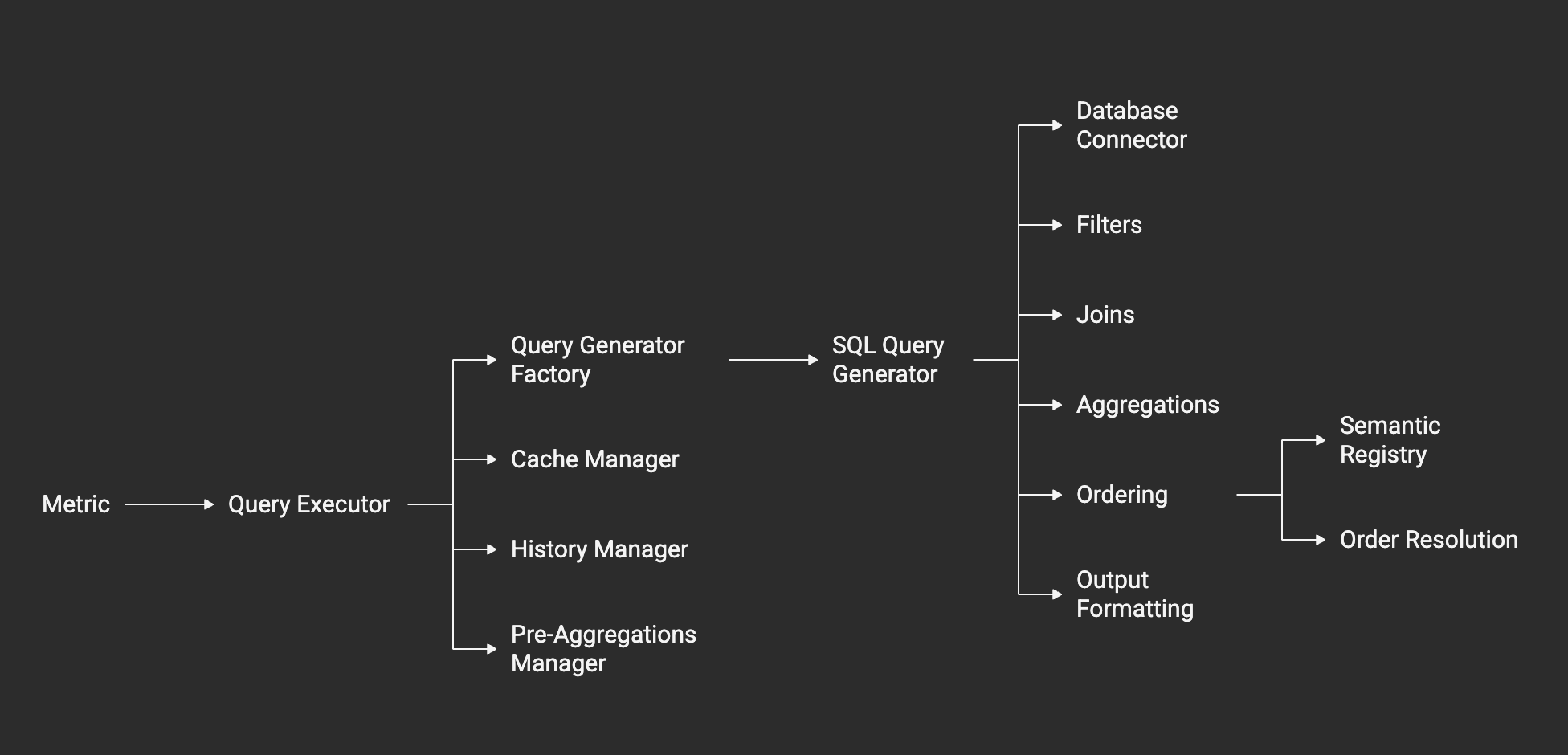
The query engine is the core component responsible for translating semantic definitions into optimized database queries. It handles SQL generation, query optimization, execution across multiple database types, and result processing.
Core Components
QueryExecutor
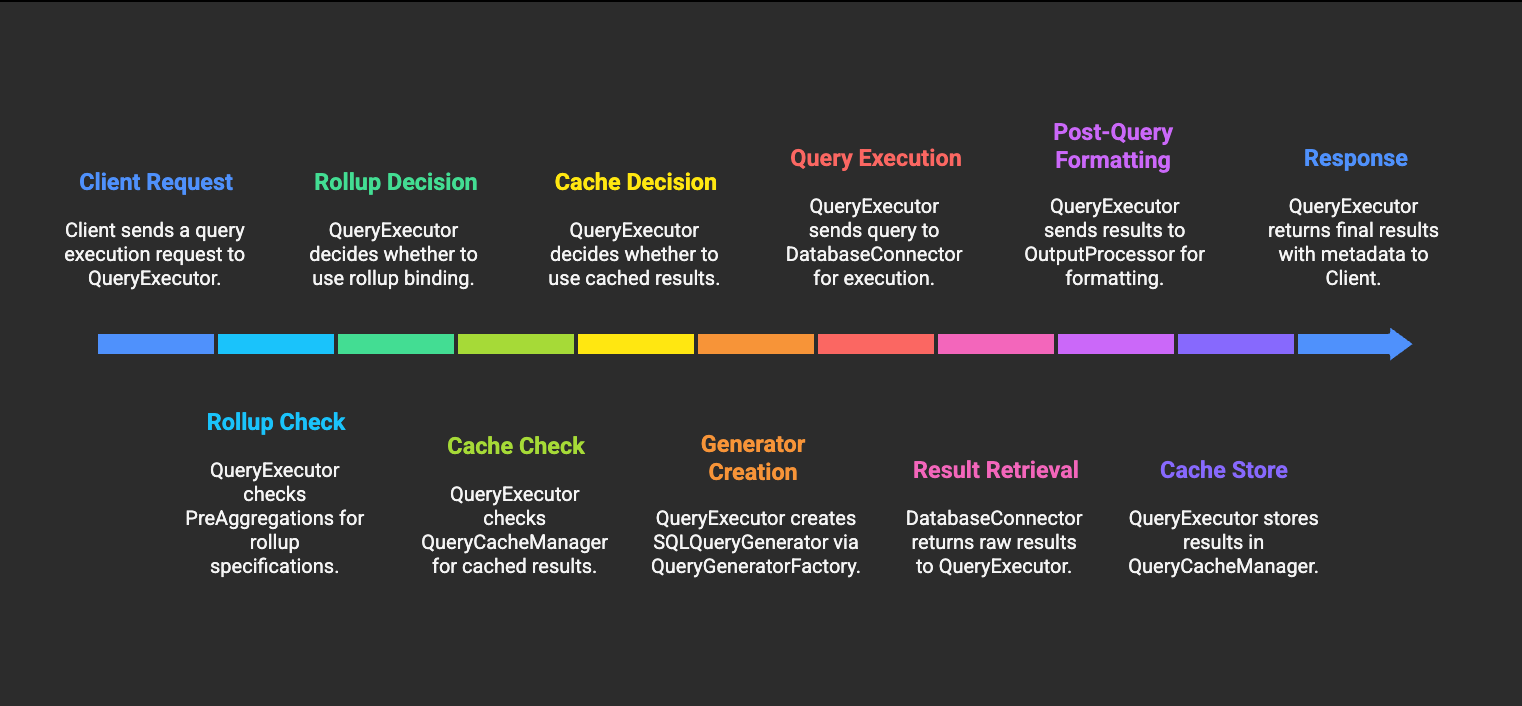
The QueryExecutor is the main entry point for metric execution. It handles query generation, execution, result processing, and comprehensive logging:
from cortex.core.query.executor import QueryExecutor

executor = QueryExecutor()
result = executor.execute_metric(
    metric=semantic_metric,
    data_model=data_model,
    parameters={"start_date": "2024-01-01"},
    limit=100,
    source_type=DataSourceTypes.POSTGRESQL
)

print(result)
# Output:
# {
#   "success": True,
#   "data": [...],
#   "metadata": {
#     "metric_id": "uuid",
#     "duration": 150.5,
#     "row_count": 50,
#     "query": "SELECT ...",
#     "parameters": {...}
#   }
# }
QueryGeneratorFactory
The factory creates appropriate query generators based on database type:
from cortex.core.query.engine.factory import QueryGeneratorFactory

generator = QueryGeneratorFactory.create_generator(
    metric=semantic_metric,
    source_type=DataSourceTypes.POSTGRESQL
)
sql_query = generator.generate_query(parameters=parameters, limit=100)
BaseQueryGenerator & SQLQueryGenerator
The base generator provides common SQL functionality, with database-specific implementations:
from cortex.core.query.engine.modules.sql.postgres import PostgresQueryGenerator

# PostgreSQL-specific generator
postgres_generator = PostgresQueryGenerator(
    metric=semantic_metric,
    source_type=DataSourceTypes.POSTGRESQL
)

# Generate query with all clauses
sql_query = postgres_generator.generate_query(
    parameters=parameters,
    limit=100,
    offset=0,
    grouped=True
)
Order Processor
The order processor handles semantic ordering by building a registry of available ordering targets and resolving order sequences to SQL ORDER BY clauses:
from cortex.core.query.processors.order_processor import OrderProcessor

processor = OrderProcessor()
order_clause = processor.process_ordering(
    metric=semantic_metric,
    semantic_registry=registry
)

print(order_clause)
# Output: ORDER BY "Total Revenue" DESC, "Month" ASC NULLS FIRST
Key Features:
- Semantic Registry: Maps measure/dimension names to SQL expressions
- Context-Aware Resolution: Resolves ordering references to actual column names
- Default Ordering: Applies intelligent defaults when no ordering specified
- Null Handling: Supports NULLS FIRST/LAST positioning
# Example: Building semantic registry
registry = {
    "total_revenue": "SUM(amount) AS \"Total Revenue\"",
    "month": "DATE_TRUNC('month', sale_date) AS \"Month\"",
    "customer_count": "COUNT(DISTINCT customer_id) AS \"Customer Count\""
}

# Process ordering sequences
order_sequences = [
    {
        "reference_type": "MEASURE",
        "reference": "total_revenue",
        "order_type": "DESC",
        "nulls_position": "LAST"
    },
    {
        "reference_type": "DIMENSION",
        "reference": "month",
        "order_type": "ASC",
        "nulls_position": "FIRST"
    }
]

order_clause = processor.build_order_clause(order_sequences, registry)
Query Processors
The query engine uses specialized processors to handle different aspects of query generation:
FilterProcessor
Converts semantic filters to SQL WHERE and HAVING clauses:
from cortex.core.query.engine.processors.filter_processor import FilterProcessor

where_clause, having_clause = FilterProcessor.process_filters(
    filters=semantic_filters,
    table_prefix="sales",
    formatting_map=formatting_map
)
JoinProcessor
Handles table joins and relationship mappings:
from cortex.core.query.engine.processors.join_processor import JoinProcessor

join_clause = JoinProcessor.process_joins(semantic_joins)
AggregationProcessor
Processes aggregation definitions and generates SQL aggregation clauses:
from cortex.core.query.engine.processors.aggregation_processor import AggregationProcessor

aggregation_clause = AggregationProcessor.process_aggregations(semantic_aggregations)
OutputProcessor
Handles output formatting with two modes:
- IN_QUERY: Applied during SQL generation
- POST_QUERY: Applied to results after execution
from cortex.core.query.engine.processors.output_processor import OutputProcessor

# Apply post-query formatting to results
formatted_results = OutputProcessor.process_output_formats(
    data=query_results,
    formats=output_formats
)
Query Execution
Execution Flow
Connection Management
The query engine manages database connections through the DBClientService:
from cortex.core.connectors.databases.clients.service import DBClientService
from cortex.core.data.db.source_service import DataSourceCRUD

# Get data source details
data_source = DataSourceCRUD.get_data_source(data_source_id)

# Get appropriate database client
client = DBClientService.get_client(
    details=data_source.config,
    db_type=data_source.source_type
)

# Connect and execute query
client.connect()
results = client.query(sql_query)
Error Handling
The QueryExecutor includes comprehensive error handling and logging:
from cortex.core.query.executor import QueryExecutor

executor = QueryExecutor()

try:
    result = executor.execute_metric(
        metric=semantic_metric,
        data_model=data_model,
        parameters=parameters
    )
except Exception as e:
    # Error is automatically logged to QueryHistory
    # with error message and execution duration
    print(f"Query execution failed: {e}")

    # Failed queries are still logged with:
    # - Error message
    # - Execution duration
    # - Query text
    # - Parameters used
Result Processing
Output Formatting
The query engine supports two types of formatting:
IN_QUERY Formatting
Applied during SQL generation:
# Example: Date truncation in SQL
dimension = {
    "name": "sale_month",
    "query": "DATE_TRUNC('month', sale_date)",
    "formatting": [
        {
            "name": "date_format",
            "type": "cast",
            "mode": "in_query",
            "target_type": "date"
        }
    ]
}
POST_QUERY Formatting
Applied to results after execution:
# Example: Currency formatting
formatter = {
    "name": "currency_format",
    "type": "format",
    "mode": "post_query",
    "format_string": "${:,.2f}",
    "locale": "en_US"
}

# Apply formatting to results
for row in results:
    row['revenue'] = formatter.apply(row['revenue'])
Output Format Types
Cortex supports several built-in output format types, which determine how query results are transformed before being returned. These are defined in the OutputFormatType enum:
| Format Type | Description | Example Use Case |
|---|---|---|
raw | No transformation; returns the value as-is | Show database value directly |
combine | Combines multiple columns into a single value, optionally with a delimiter | Concatenate first and last name |
calculate | Performs mathematical operations on columns (add, subtract, multiply, divide) | Compute profit as revenue - cost |
format | Applies string or value formatting (date, number, currency, etc.) | Format a date as "Jan 15, 2024" or a number as "$1,234.56" |
cast | Casts a value to a different type (string, integer, float, date, etc.) | Convert a string to a date |
Example: format Type Built-in Formatters
When using the format type, you can specify a format_type for common formatting needs:
format_type | Description | Example Input | Example Output |
|---|---|---|---|
datetime | Date/time formatting | 2024-01-15 14:30:00 | Jan 15, 2024 2:30 PM |
date | Date formatting | 2024-01-15 | Jan 15, 2024 |
number | Number formatting with grouping | 1234567 | 1,234,567 |
currency | Currency formatting | 1234.56 | $1,234.56 |
percentage | Percentage formatting | 0.4567 | 45.67% |
custom | Custom format string (e.g., "%.2f") | 123.456 | 123.46 |
Other types such as combine, calculate, and cast are used for column operations and type conversions, not just display formatting.
See the OutputFormatType definition for the authoritative list.
Caching and Performance
Query Result Caching
The query engine uses QueryCacheManager for result caching with multiple cache modes:
from cortex.core.cache.manager import QueryCacheManager
from cortex.core.cache.factory import get_cache_storage
from cortex.core.config.models.cache import CacheConfig

# Initialize caching
cfg = CacheConfig.from_env()
cache_manager = QueryCacheManager(get_cache_storage(cfg))

# Cache modes
class QueryCacheMode(str, Enum):
    UNCACHED = "UNCACHED"  # Executed directly against source
    CACHE_HIT = "CACHE_HIT"  # Served from cache
    CACHE_MISS_EXECUTED = "CACHE_MISS_EXECUTED"  # Not in cache; executed and written
    CACHE_REFRESHED = "CACHE_REFRESHED"  # Stale entry refreshed
Cache Key Generation
Cache keys are generated using query signatures and time buckets:
from cortex.core.cache.keys import build_query_signature, derive_time_bucket, build_cache_key

# Build cache signature
signature_payload = {
    "workspace_id": str(workspace_id),
    "environment_id": str(environment_id),
    "data_model_id": str(data_model.id),
    "metric_id": str(metric.id),
    "parameters": parameters or {},
    "context_id": context_id,
    "source_type": source_type.value,
    "grouped": grouped,
    "limit": limit,
    "offset": offset,
    "bucket": derive_time_bucket(start_time, metric.refresh),
    "metric_version": metric.version
}

cache_signature = build_query_signature(signature_payload)
cache_key = build_cache_key(cache_signature)
Cache Configuration
Caching can be controlled at multiple levels:
# Environment-level configuration
env_enabled = bool(cfg.enabled)

# Metric-level configuration
metric_enabled = bool(metric.cache.enabled)

# Request-level configuration
request_enabled = bool(cache_preference.enabled)

# Final cache decision
cache_enabled = request_enabled if request_enabled is not None else (env_enabled and metric_enabled)
Advanced Query Features
Complex Joins
Handle multiple table relationships:
# Multi-table join with complex conditions
join_definition = {
    "name": "customer_order_product",
    "type": "inner",
    "tables": [
        {
            "table": "orders",
            "alias": "o",
            "joins": [
                {
                    "table": "customers",
                    "alias": "c",
                    "condition": "o.customer_id = c.customer_id"
                },
                {
                    "table": "order_items",
                    "alias": "oi",
                    "condition": "o.order_id = oi.order_id"
                },
                {
                    "table": "products",
                    "alias": "p",
                    "condition": "oi.product_id = p.product_id"
                }
            ]
        }
    ]
}
Query History and Monitoring
Query History
The query engine automatically logs all query executions with comprehensive metadata:
from cortex.core.query.history.service import QueryHistoryService

# Get query history for a specific metric
history = QueryHistoryService.get_metric_query_history(
    metric_id=metric_id,
    limit=100,
    include_failed=True
)

# Get execution statistics
stats = QueryHistoryService.get_metric_execution_stats(
    metric_id=metric_id,
    time_range="7d"
)

# Get slow queries
slow_queries = QueryHistoryService.get_metric_slow_queries(
    metric_id=metric_id,
    limit=10,
    threshold_ms=1000.0
)
Query Logging
Every query execution is automatically logged with:
- Query text and parameters
- Execution duration and row count
- Cache mode (UNCACHED, CACHE_HIT, CACHE_MISS_EXECUTED, CACHE_REFRESHED)
- Success/failure status and error messages
- Context information (workspace, environment, consumer)
- Query hash for deduplication
from cortex.core.query.history.logger import QueryLog, QueryCacheMode

# Query log entry
log_entry = QueryLog(
    metric_id=metric_id,
    data_model_id=data_model_id,
    query=generated_sql,
    duration=150.5,
    row_count=50,
    success=True,
    cache_mode=QueryCacheMode.CACHE_MISS_EXECUTED,
    query_hash="abc123..."
)
Best Practices
Query Optimization
- Limit result sets when possible
- Use efficient join types (INNER vs LEFT vs RIGHT)
- Use query result caching for expensive calculations
Performance Monitoring
- Monitor query execution times
- Track query success/failure rates
Error Handling
- Implement proper retry logic for transient failures
- Log detailed error information for debugging
- Graceful degradation when services are unavailable
The query engine is designed to be highly extensible, supporting new database types and query features while maintaining optimal performance and reliability.